I've tried getting rid of a few of our newer mods, and I've tried deleting my Minecraft config files.
Both to no effect.
Here's the log: https://mclo.gs/rj0IGQn
Learn more about this change here.
For help regarding Aternos, we recommend you to visit our support center.
I've tried getting rid of a few of our newer mods, and I've tried deleting my Minecraft config files.
Both to no effect.
Here's the log: https://mclo.gs/rj0IGQn
I can see that versions of many mods don't match and there are few mods that are missing on the server but are on the client. Please check if the mods installed on your PC match the mods installed on your server with the versions. Even after matching if you face the issue then try deleting the config both server and client side
Okay, I went over both my mod list and the server's mods again, and added in a few client side mods that I could add to the server like better fps and better block placement.
Got the same error again, and here's the log: https://mclo.gs/rfecOPL
Then I got rid of the server's and my own config.
Same thing happened, and here's the log: https://mclo.gs/4YW8WYK
Thanks for your quick reply by the way.
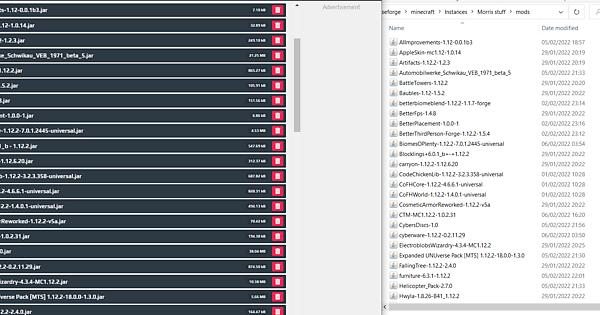
Please share a screenshot of the mods on both the server and client side
Ok its seems to match but the client log doesn't say so. Check if the forge version on your PC matches the forge version on your server. If it matches then try connecting to the server with dyn ip and put the dyn ip in "direct connection" then connect to the server.https://support.aternos.org/hc/en-us/articles/360026805072-Connect-to-your-server